License and Membership Status
Check your TG-Downloader plan, daily points, expiry date, device status and activation code in the License settings page.
Open Settings → License to see the membership status applied to the current app account.
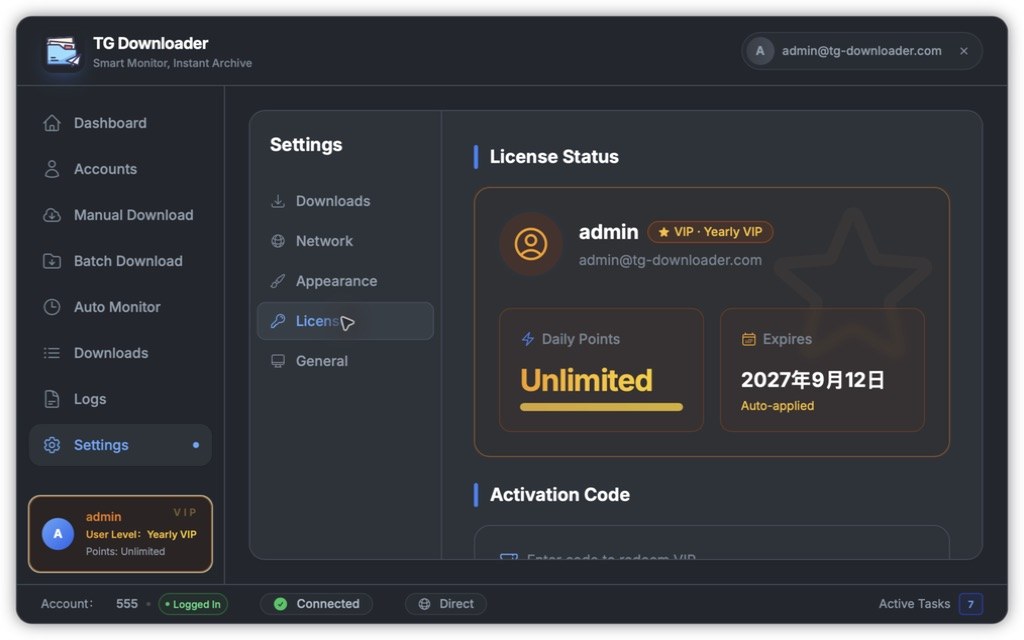
What the license card shows
| Field | Meaning |
|---|---|
| User name / VIP badge | The signed-in app account and its current plan |
| Daily Points | How much you can download today. Paid and trial members see Unlimited |
| Expires | When the plan ends. After expiry, the account returns to free-member limits |
| Auto-applied | The plan follows the app account across its allowed devices |
If the card says refreshing, it is requesting the latest status from the server. This is normal.
If the license card does not refresh
- Confirm the status bar shows Connected.
- Open Network, turn off the proxy, and try again.
- Sign out and sign back in.
- If the problem continues, include your Device ID and the ERROR lines from Logs when contacting support.
Activation codes
Activation code redemption is in the lower half of the same page. See Redeem an Activation Code for the full process and error messages.