Redeem an Activation Code
Redeem a TG-Downloader activation code, confirm your membership and expiry date, and resolve invalid, expired or already-used code errors.
Open Settings → License → Activation Code.
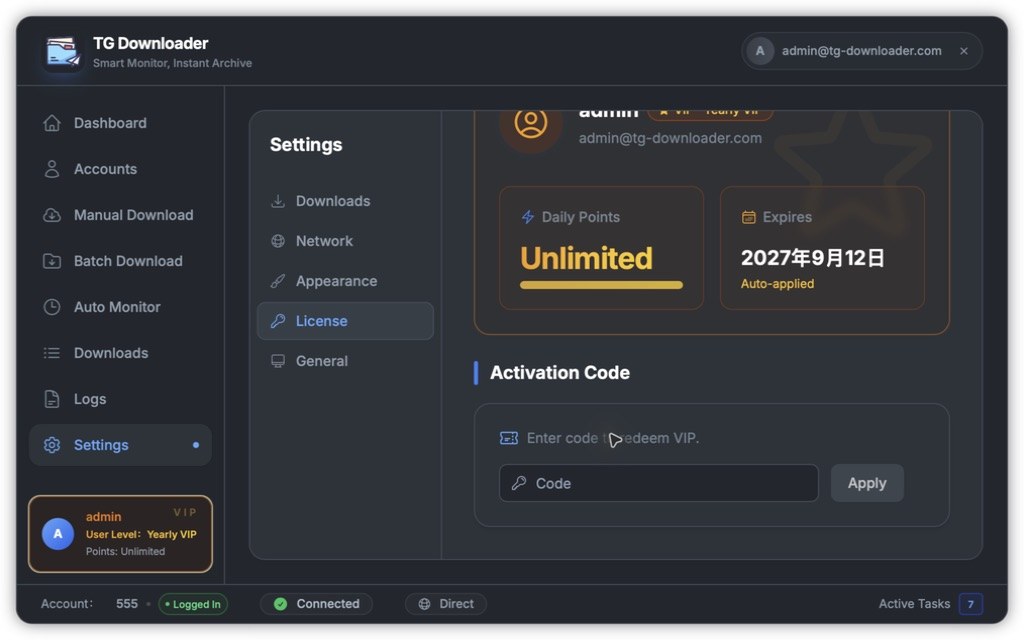
- Paste a code in the form
TGDL-XXXXXXXX-XXXXXXXX. - Click Apply. Membership takes effect immediately.
- Confirm the tier and expiry date under Settings → License.
- Each code can be used once.
- Promotional codes may have limits per user and per device.
- You must be signed in to the app account.
Redemption errors
| Message | Cause |
|---|---|
| Activation failed. Please sign in first. | No app account is signed in |
| Activation code is required / too short | The value is empty or incomplete |
| Activation code may only contain letters, digits and dashes | A space or newline was included |
| Activation code does not exist or is invalid | The code was entered incorrectly |
| This activation code has already been used | Each code works once |
| This activation code has expired | The promotion ended |
| This promotion can only be used once per user and device | The usage limit was reached |
| Network error. Please check your connection. | Check the network or proxy and retry |
See License and Membership Status for expiry and device status.