Add New Account
Detailed account addition process supporting 4 login methods
TG-Downloader currently supports 4 Telegram account login methods, covering various scenarios from fully automatic to manual verification. Below is a detailed introduction and step-by-step guide for each method.
:::tip[Safety Recommendation] We strongly recommend using a secondary Telegram account (not your main account) for download operations. Since batch downloading involves frequent API requests and data fetching, although the software has built-in anti-ban mechanisms, there is still a certain risk of being flagged. For the safety of your main account, please avoid using it for large-scale resource collection tasks. :::
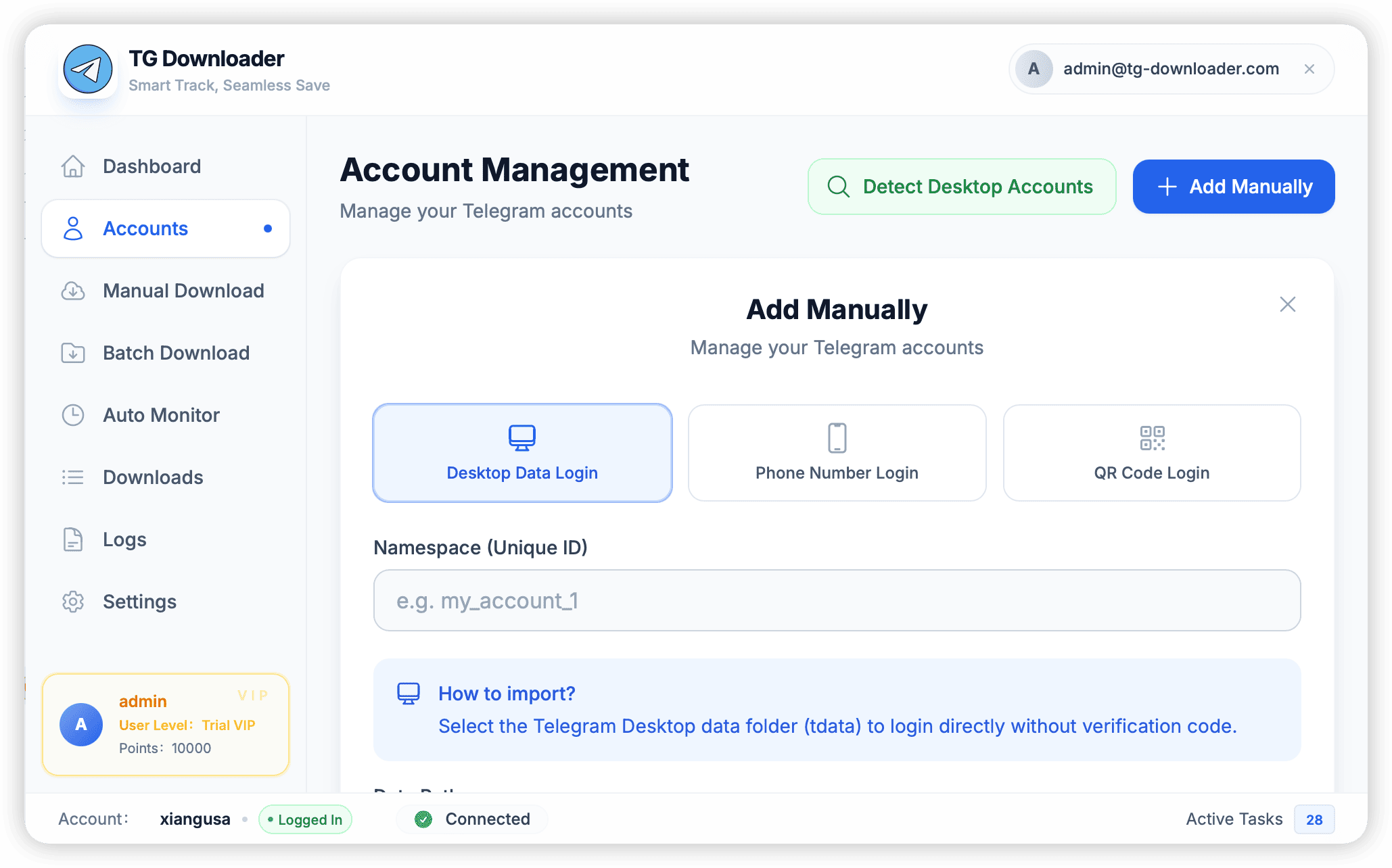
1. Auto Detect
This is the simplest and fastest way, suitable if you have already installed and logged into Telegram Desktop (official version) on your computer.
- Scenario: Telegram official client is installed on the local machine.
- Steps:
- Open the Account Management page in the software.
- Click the “Detect Desktop Account” button.
- The software will automatically scan the Telegram data in the system default path.
- If detected successfully, the found accounts will be listed. Click “One-Click Import” to log in directly without any verification code.
2. Import tdata Folder
If you are using the Portable version of Telegram, or if Auto Detect fails to find your account, you can use this method.
- Scenario: Using Telegram Portable version, or managing multiple account instances.
- Steps:
- In the Account Management page, select “Manual Add”.
- In Login Type, select “Desktop Data Login”.
- Click the folder icon next to “Data Path”.
- Locate and select the
tdatafolder in your Telegram installation directory. - Click Login to skip verification code and enter directly.
3. Phone Number + Verification Code
The most traditional login method, logging in by receiving a verification code from Telegram.
- Scenario: No desktop data available, or want to log in to a new account.
- Steps:
- In the Account Management page, select “Manual Add”.
- In Login Type, select “Phone Number Login”.
- Enter your phone number (Note: Must include country code, e.g.,
+1234567890). - Click “Send Code”.
- Check your mobile Telegram App (or SMS) and enter the 5-digit verification code received.
- If you have enabled Two-Step Verification (2FA), the software will prompt you to enter your 2FA password.
- Click Login to complete the operation.
4. QR Code Login
Similar to WhatsApp Web login, no need to enter phone number and password, very convenient.
- Scenario: Phone is at hand, and you don’t want to manually enter the phone number.
- Steps:
- In the Account Management page, select “Manual Add”.
- In Login Type, select “QR Code Login”.
- Click “Generate QR Code”, and a QR code will appear on the screen.
- Open your mobile Telegram App.
- Go to Settings -> Devices -> Click “Link Desktop Device”.
- Scan the QR code on the screen to confirm login.
:::caution[Anti-Ban Tips] Do not immediately perform high-frequency downloads or join groups with newly logged-in accounts (especially +86 accounts). It is recommended to “warm up” the account for 3-5 days to avoid being banned by Telegram. :::