TG Downloader Chrome Extension Is Now Available
The first version of the TG Downloader Chrome extension is now live in the Chrome Web Store. Install it to send videos, photos, and files from Telegram Web directly to TG Downloader.
The first version of the TG Downloader Chrome extension is complete and now available in the Chrome Web Store.
Install TG Downloader from the Chrome Web Store
You can download and use it today. Install the extension to select videos, photos, or files in Telegram Web and send them to TG Downloader.

TG Downloader already supports downloading individual Telegram messages by link, downloading channel or group history in bulk, and monitoring new messages.
But many users do not need to download everything. They simply want to save a few specific items while browsing Telegram Web.
That is exactly what the TG Downloader Chrome extension is designed for.
Available now in the Chrome Web Store
The first version of the TG Downloader Chrome extension is complete and available now.
If you want to browse Telegram Web and download only the items you choose, you can install it today:
Install from the Chrome Web Store
After installation, open Telegram Web and look for the download action beside supported videos, photos, and files.
Download only what you want
The extension adds a “Download to TG Downloader” action to supported messages in Telegram Web.
When you see something you want to keep, just click it.
Browse Telegram Web
    ↓
Find something worth saving
    ↓
Click “Download to TG Downloader”
    ↓
The task is sent to TG Downloader
    ↓
The download begins
No copying message links.
No switching back and forth between Telegram Web and TG Downloader.
Just keep browsing and download the items you actually want.
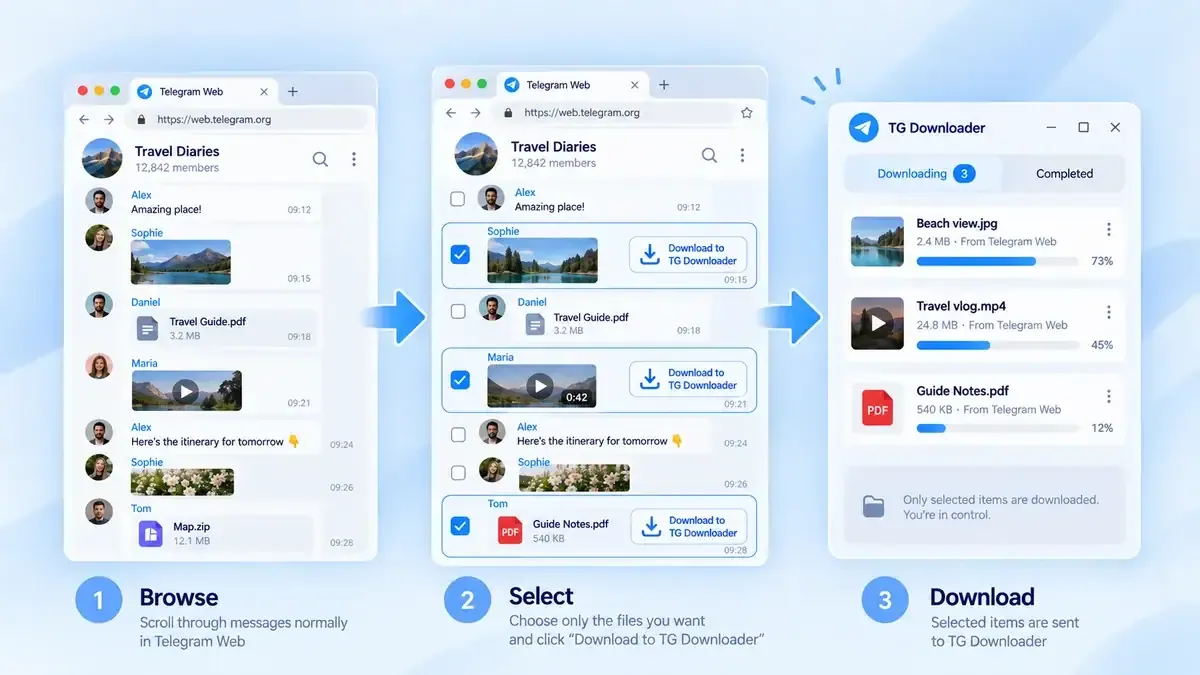
Made for selective downloading
Imagine a channel that posts dozens or even hundreds of messages every day.
You may only want to save two videos and one file.
In that situation, there is no reason to:
- Download the entire channel
- Monitor every new message
- Copy and paste each message link manually
With the extension, simply choose the individual items you want as you browse.
That is the main purpose of the extension:
Browse normally. Download selectively.
The extension works with TG Downloader
The Chrome extension is not a separate download manager.
Its job is to make TG Downloader easier to use from Telegram Web. When you click the download action, the selected item is sent to the TG Downloader app on your computer, which handles the actual download.
Telegram Web
    ↓
Chrome extension
    ↓
TG Downloader
    ↓
Saved locally
Individual files can be handled directly through the browser workflow. When you select multiple items, the batch can be sent to TG Downloader Desktop for processing.
Keep using Telegram the way you already do
You do not need to change how you use Telegram Web.
Open a channel.
Scroll through messages.
Watch videos.
View photos.
Check files.
When you find something you want to save, click “Download to TG Downloader.”
That is it.
You do not have to decide in advance whether an entire channel should be downloaded, and you do not need to enable monitoring just to save a few items.
Downloading becomes part of the normal browsing experience.
Privacy and account security
The extension will not ask you to enter your Telegram password.
Its role is limited to passing the download task you selected to the TG Downloader app running on your computer. The actual download is handled using the Telegram account already signed in to TG Downloader.
The extension also does not bypass Telegram’s access permissions.
If your account cannot access a message, the extension will not provide a way around that restriction.
Install it today
The first version of the TG Downloader Chrome extension is available now:
Open the Chrome Web Store to install the extension
If you already use TG Downloader Desktop, you can now hand off selected media and batch tasks from your browser.
When you see a video, photo, or file worth keeping, there is no need to copy a link or search for it again in the app.
Click once.
Download only what you want.